이 가이드는 SAP Business Technology 플랫폼(BTP)에서 프로세스 통합 런타임 인스턴스에 대한 서비스 키를 얻는 방법을 보여줍니다. SAP Process Integration에 대한 모니터링을 구성하려면 이 서비스 키가 필요합니다.
전제 조건
- 적절한 권한이 있는 BTP subaccount 에 대한 액세스
- Space 에 대한 BTP administrator 의 확인 및 Grant-types
프로세스 통합 런타임 인스턴스 생성
BTP (Business Technology Platform) subaccount에 로그인합니다.
BTP cockpit에서 Instances and Subscriptions를 클릭합니다.
오른쪽 상단의 Create 를 클릭하세요.
팝업 화면에서 다음을 선택하세요.
Service: SAP Process Integration Runtime
Plan: API
cost disclaimer 확인란을 선택합니다.
Runtime Environment: Cloud Foundry
Space: 귀하의 담당자에게 확인하세요 BTP administrator
Instance Name: 조직 명명 규칙을 따릅니다
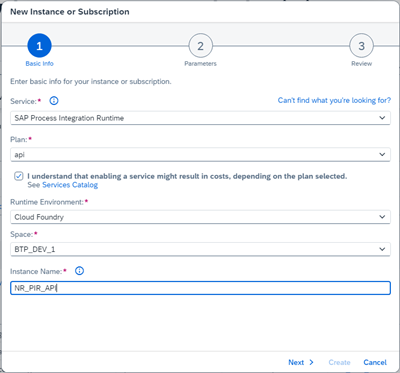
Next을(를) 클릭한 다음 선택합니다:
Roles:
MonitoringDataReadGrant-types: Default Client Credentials (다른 유형이 사용되는지 BTP administrator 및 보안 팀에 확인하십시오)
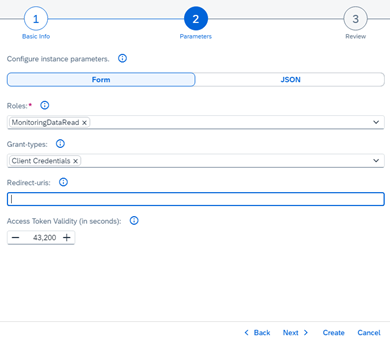
Next 을(를) 클릭하여 세부 정보를 검토하세요.
Create 을(를) 클릭합니다.
서비스 키를 생성하고 다운로드합니다.
인스턴스를 만든 후 Instances 탭에서 해당 서비스를 찾으십시오.

새로 생성된 인스턴스의 행에 있는 줄임표(
...)를 클릭한 다음 Create Service Key을(를) 선택합니다.Service Key Name 를 입력하고 Key Type:
ClientId/Secret를 선택합니다.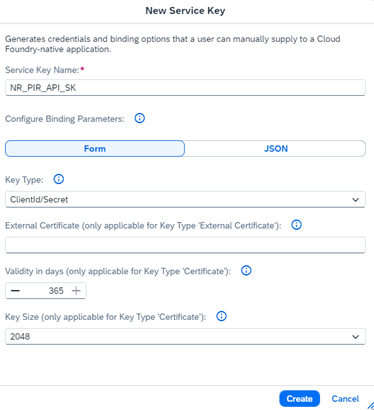
Create 을(를) 클릭합니다.
service key 행에 있는 줄임표(
...)를 클릭한 다음 Download을(를) 선택합니다.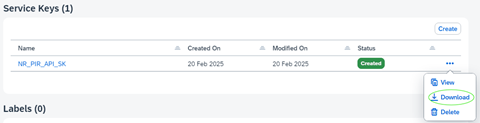
service key file은(는) JSON file(으)로 다운로드됩니다. 안전하게 보관하십시오. 모니터링 설정을 구성하려면 이 파일의 자격 증명이 필요합니다.