• /
  • EnglishEspañolFrançais日本語한국어Português
  • 로그인지금 시작하기

사용자의 편의를 위해 제공되는 기계 번역입니다.

영문본과 번역본이 일치하지 않는 경우 영문본이 우선합니다. 보다 자세한 내용은 이 페이지를 방문하시기 바랍니다.

문제 신고

BTP에서 - API 관리, API 포털

  1. BTP subaccount에 로그인합니다.

  2. BTP cockpit에서 Instances and Subscriptions를 클릭합니다.

  3. 오른쪽 상단의 Create 를 클릭하세요.

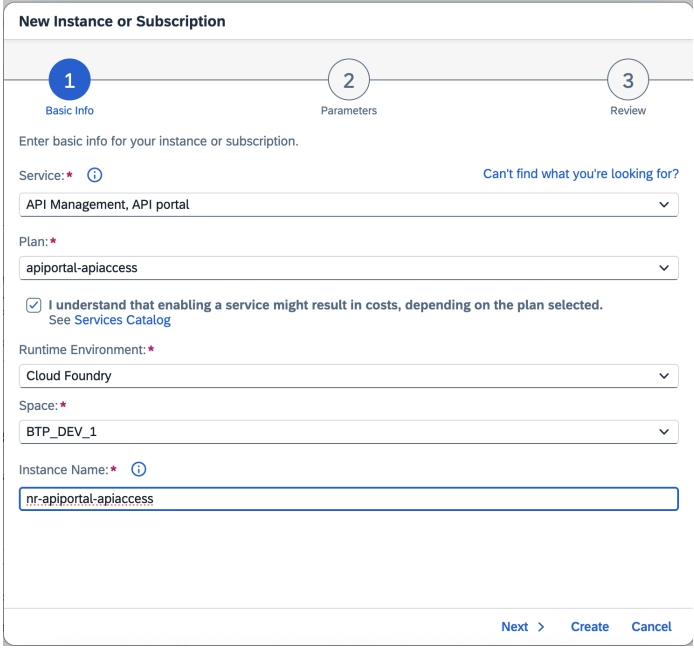
  4. 팝업 화면에서 다음을 선택하세요.

    • Service: API Management, API Portal
    • Plan: apiportal-apiaccess
    • Runtime Environment: Cloud Foundry
    • Space: 귀하의 담당자에게 확인하세요 BTP administrator
    • Instance Name: 조직 명명 규칙을 따릅니다
    The Create Instance dialog showing Service, Plan, Runtime Environment, Space, and Instance Name fields for SAP Cloud ALM API
  5. 비용 면책 조항을 확인하세요.

  6. Next을(를) 클릭한 다음 Roles: APIPortal.Administrator을(를) 선택합니다.
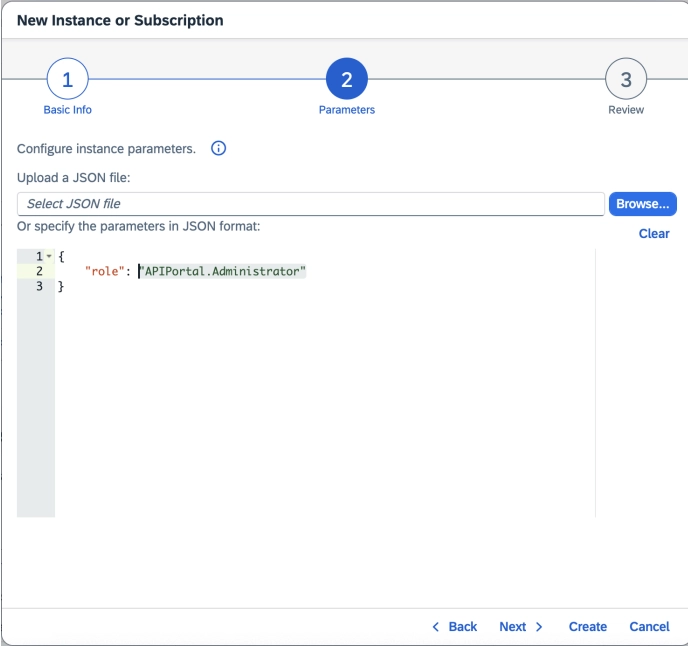
    The Create Instance dialog showing Service, Plan, Runtime Environment, Space, and Instance Name fields for SAP Cloud ALM API
  7. Next 을(를) 클릭하여 세부 정보를 검토하세요.

  8. Create 을(를) 클릭합니다.

  9. 서비스를 만든 후 Instances 탭에서 해당 서비스를 찾으세요.

  10. 인스턴스 옆에 있는 줄임표(...)를 클릭한 다음 Create Service Key을(를) 클릭합니다.

  11. JSON formatService Key NameCredential Type을(를) 입력하세요: binding-secret.
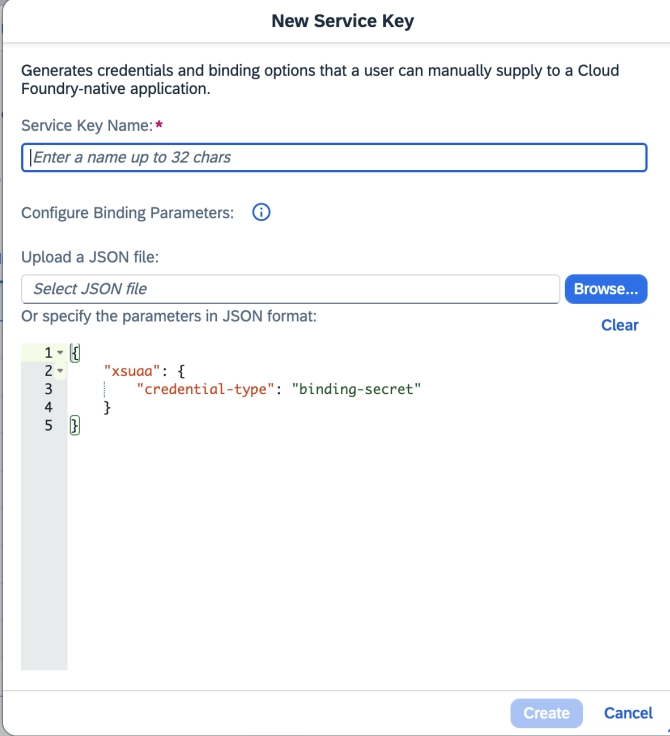
The Create Instance dialog showing Service, Plan, Runtime Environment, Space, and Instance Name fields for SAP Cloud ALM API
  1. Create을(를) 클릭한 다음 service key 옆에 있는 줄임표(...)를 클릭하여 다운로드하세요.
Copyright © 2026 New Relic Inc.

This site is protected by reCAPTCHA and the Google Privacy Policy and Terms of Service apply.