Azure Virtual Network (VNet) Flow Logs allow you to log information about IP traffic flowing through your virtual networks. With the New Relic VNet Flow Logs Forwarder, you can automatically forward these logs to New Relic for performance analytics and network connectivity troubleshooting.
How it works
The VNet Flow Logs Forwarder is an event-driven Azure Function App:
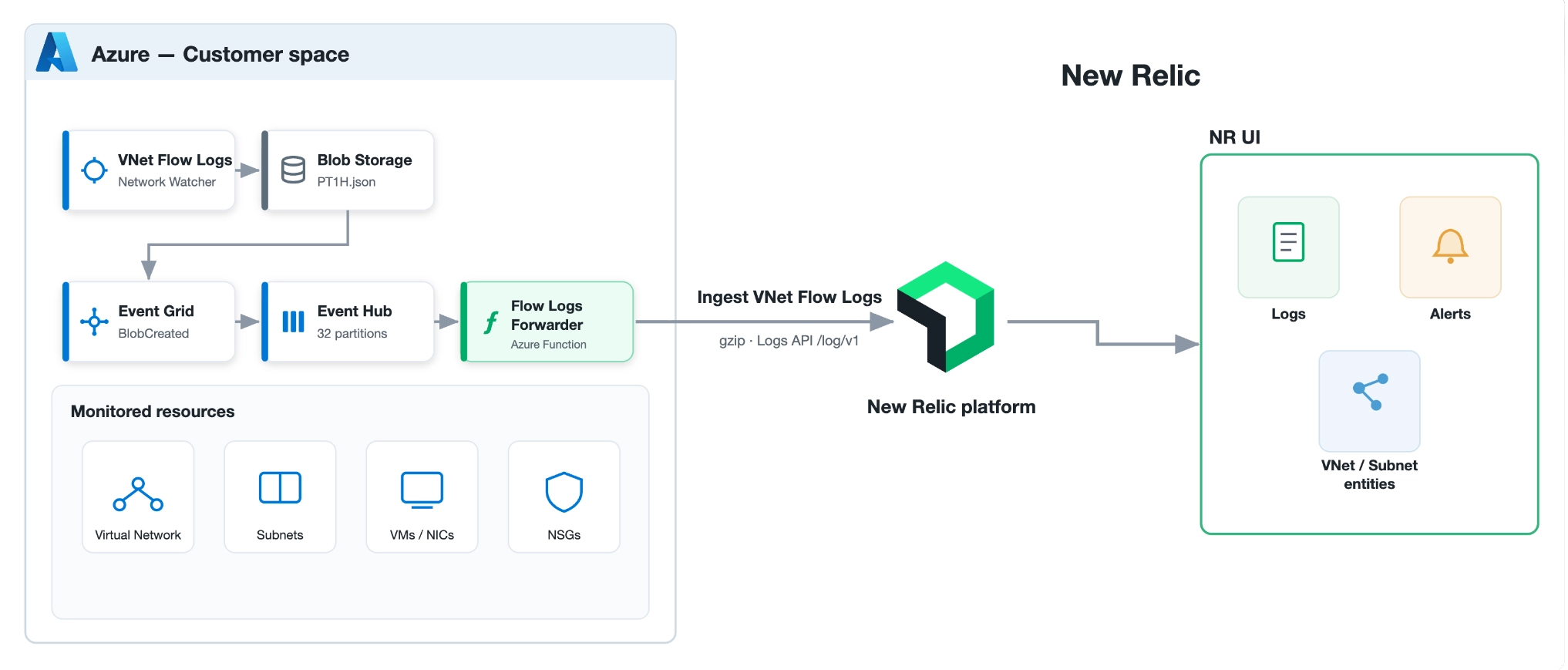
Event Grid → Event Hub: An Event Grid subscription on your flow-log storage account listens for
BlobCreatedevents on the PT1H.json blobs and delivers them directly to an Event Hub. The subscription uses the blob path (event subject) as the partition key to guarantee per-file chronological ordering. There's no separate relay function.VNetFlowLogsConsumer: An Event Hub-triggered function that processes each blob event by:
- Reading a cursor from Azure Table Storage to determine what's already been processed.
- Downloading only newly appended blocks from the PT1H.json blob (delta reads).
- Parsing VNet flow log records (flow tuples) into structured log entries.
- Sending the parsed records to New Relic via the Logs API.
- Committing the updated cursor on successful delivery.
VNetFlowLogsCleanup: A timer-triggered function that periodically removes stale cursor entries from Azure Table Storage (by default, daily at 03:00 UTC).
This architecture ensures efficient, incremental processing — only new data is read and forwarded, avoiding duplicate processing of already-seen records.
Prerequisites
New Relic prerequisites
You need the following in New Relic:
- A New Relic account. Don't have one? Sign up for free! No credit card required.
- A New Relic .
Azure prerequisites
You need the following in Azure:
- An Azure subscription with VNet Flow Logs enabled on the target virtual networks. See Microsoft's documentation on enabling VNet Flow Logs.
- A Storage Account where your VNet Flow Logs are being written (PT1H.json blobs).
- An Event Hub namespace and Event Hub for event delivery (can be created automatically by the ARM/Bicep template).
- An Azure Storage Account for the Function App runtime and cursor table storage (can be created automatically by the ARM/Bicep template).
Deploy the VNet Flow Logs Forwarder
You can deploy the VNet Flow Logs Forwarder using ARM/Bicep templates (recommended) or manually.
The New Relic VNet Flow Logs ARM template and Bicep template provide automated deployment of all required resources.
The template will automatically:
Create an Event Hub namespace, Event Hub, and consumer group
Deploy the Function App on your selected hosting plan with the Node.js 22 runtime and the VNet Flow Logs functions
Create a Storage Account for the Function App runtime and cursor tracking
Create an Event Grid system topic and subscription that routes PT1H.json blob-creation events directly to the Event Hub
Assign a managed identity with the required role assignments
Configure all necessary application settings
Optionally enable private networking with VNet integration and private endpoints
Follow these steps:
Go to one.newrelic.com > Integrations & Agents.
Under Collections, select Logging, then click the Microsoft Azure VNet Flow Logs tile.
From the Select an account dropdown, choose the account to send your logs to, and click Continue.
On the Enter your license key step, click Create a new key, click Copy key and save it somewhere safe, then click Continue.
Click Deploy to Azure. A new tab opens in Azure with the ARM template loaded.
Select the Resource group and a Region for the deployment. We recommend a new resource group, to avoid accidentally deleting the components it creates.
In the New Relic license key field, paste the license key you copied earlier.
Ensure the New Relic endpoint is set to the one corresponding to your account (US, EU, JP, or FedRAMP for US Gov Cloud).
(Optional) Enter the Source Storage Account Name where your VNet Flow Logs are stored. It must be in the same resource group as this deployment. Leave it blank to create a new source storage account automatically.
(Optional) Select Disable Public Access To Storage Account to enable private networking mode with VNet integration and private endpoints.
(Optional) Select the Function App Plan dropdown. Four values:
FlexConsumption(default),ElasticPremium,Basic, orConsumption. See Choose a hosting plan below for guidance on when to pick each.(Optional) Configure advanced settings:
- New Relic Tags: Semicolon-separated tags (format:
key1:value1;key2:value2) - Max Retries: Maximum delivery retry attempts (default: 3)
- Retry Interval: Milliseconds between retries (default: 2000)
- Function Log Level: Verbosity of the Function App logs —
Trace,Debug,Information,Warning, orError(default:Information) - Max Event Batch Size: Maximum number of Event Hub events processed per batch (default: 10)
- Min Event Batch Size: Minimum number of Event Hub events per batch (default: 5)
- Max Wait Time: Maximum time the trigger waits to fill a batch before processing, as
hh:mm:ss(default:00:00:30) - Event Hub Scaling Mode:
Basic(1 throughput unit, 4 partitions, no auto-inflate — low-to-medium traffic) orEnterprise(auto-inflate up to 40 throughput units, 32 partitions — high-throughput volumes) (default:Basic)
- New Relic Tags: Semicolon-separated tags (format:
Click Review + create, review the configuration, and click Create.
Back in New Relic, on the Create log partition step, click Create partition. This creates a
Log_VNET_Flows_Azuredata partition (rule:instrumentation.name = 'vnet-app', STANDARD retention) so your VNet Flow Logs are stored and queried separately from your other logs. If aLog_VNET_Flows_Azurepartition already exists on the account, click Continue to skip this step.On the Test your logs step, confirm data is arriving by running
SELECT * FROM Log_VNET_Flows_Azure, then click See your data.Choose a hosting plan
The template deploys the Function App on one of four Azure hosting plans, selected with the Function App Plan dropdown. The default is
FlexConsumption.Plan
When to pick
Gov Cloud
FlexConsumption(default)Any region where Flex Consumption is Generally Available. Modern serverless model with native VNet integration that scales elastically without pre-warmed capacity.
—
ElasticPremiumProduction or bursty workloads in regions where Flex Consumption is not yet available, or workloads with a strict no-cold-start SLA.
Supported
BasicSmall tenants or development deployments that need private networking. Cheapest VNet-capable option. Not suitable for high-throughput workloads.
Supported
ConsumptionPublic-network development or evaluation deployments where private networking isn't required. Cheapest overall.
Supported
Importante
Consumptiondoesn't support Azure VNet integration. If you enable Disable Public Access To Storage Account, pick one ofFlexConsumption,ElasticPremium, orBasic— the deployment fails-fast within the first minute if you combineConsumptionwith private networking.Deployment architectures
The ARM/Bicep template supports two deployment modes:
Standard deployment (default):
Uses Event Grid to monitor blob creation in the source storage account
Routes events directly to the Event Hub for ordered processing, using the subject as the partition key
Processes VNet flow logs in the Function App and forwards them to New Relic
Enables public network access on the Function App, its storage account, and the Event Hub
Private networking deployment (optional,
disablePublicAccessToStorageAccount=true):Includes all features of the standard deployment
Isolates the Function App, its storage account, and the Event Hub within a private virtual network, with public network access to them disabled
Adds VNet integration with private endpoints for storage services (blob, file, queue, and table)
Creates private DNS zones for name resolution
Routes all outbound traffic — including calls to the New Relic Logs API — through the VNet integration subnet.
If you prefer manual deployment or need custom configuration:
- Deploy the azure-vnet-flow-logs Function App to your Azure subscription.
- Ensure the
VNetFlowForwarderfunctions (VNetFlowLogsConsumerandVNetFlowLogsCleanup) are included in the deployment. - Configure the required environment variables (application settings) listed below.
- Set up an Event Grid subscription on your flow-log storage account to route
BlobCreatedevents directly to the Event Hub, using the event subject as the partition key.
Configuration
Configure the following application settings on your Azure Function App:
Required settings
Environment variable | Description |
|---|---|
| Your New Relic license key. |
| Connection string for the Azure Storage account where VNet Flow Logs are stored. |
| Connection string for the Azure Storage account used to persist cursor state (can be the same as source). |
| Connection string for the Event Hub that delivers blob-creation events to the consumer function. |
| Name of the Event Hub instance. |
Optional settings
Environment variable | Description | Default |
|---|---|---|
| New Relic Logs API endpoint. Defaults to the US endpoint. Override for other regions: |
|
| Semicolon-separated tags to add to all forwarded logs. Format: | None |
| Maximum number of delivery retries to New Relic. |
|
| Interval between retries in milliseconds. |
|
| Event Hub consumer group. |
|
| Number of hours to retain blob-cursor records before the cleanup job removes them. |
|
| NCRONTAB schedule for the cursor cleanup timer trigger. |
|
| Number of consecutive failures per blob before the forwarder skips it as a poison event. |
|
View flow log data
Once configured, VNet Flow Log data will appear in New Relic. You can query it using NRQL:
SELECT * FROM Log_VNET_Flows_Azure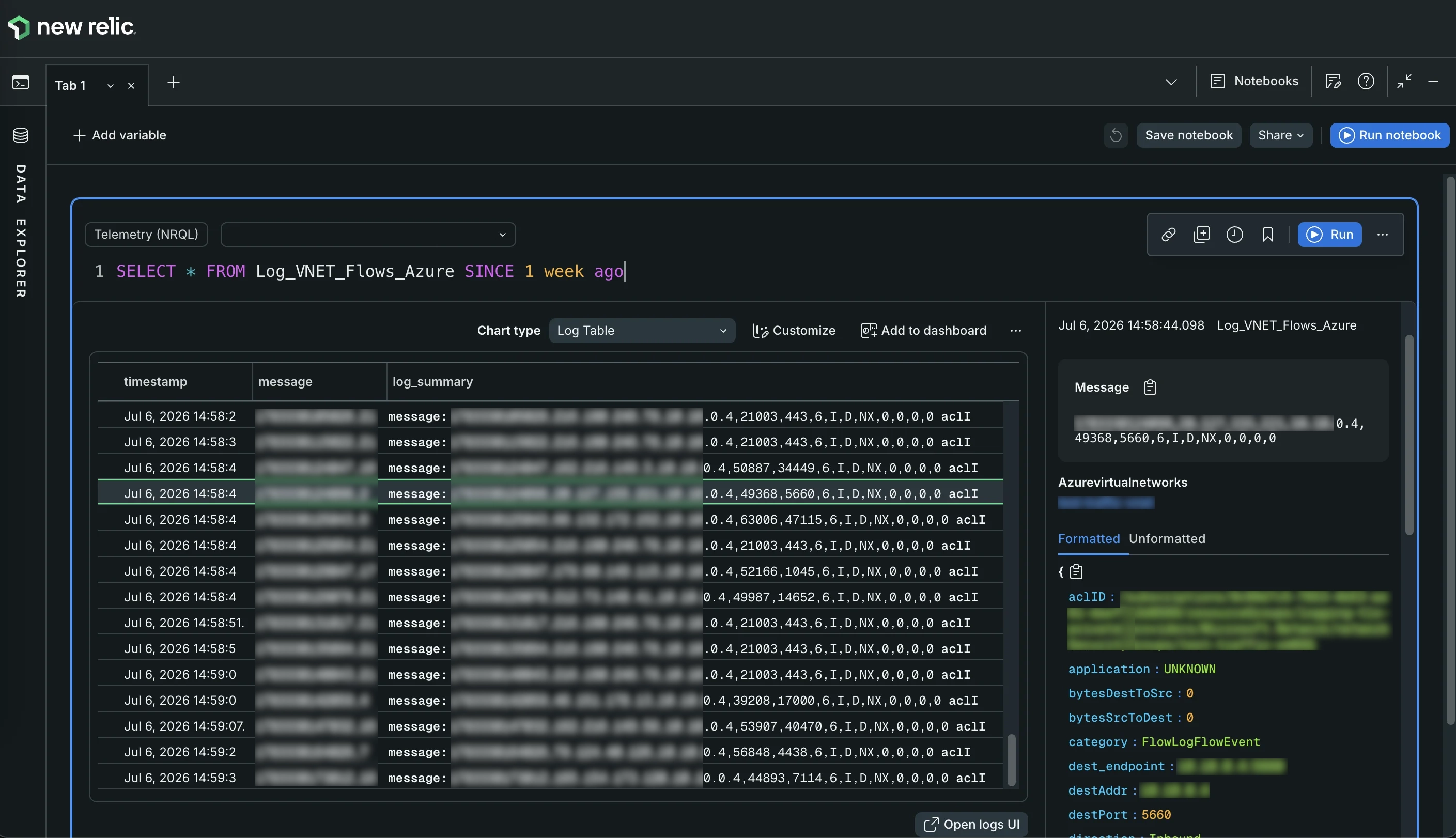
You can also visualize this data in the Conversations view, which groups your top flows by source, direction, protocol, and destination:
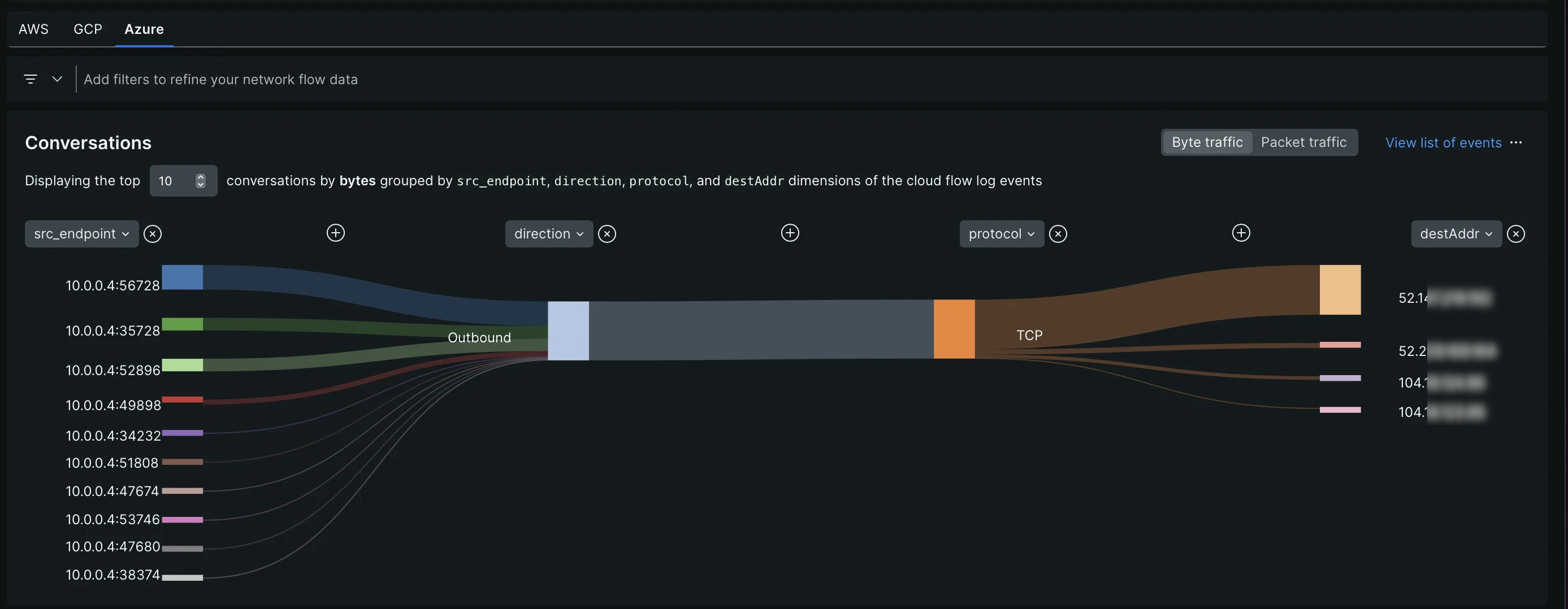
Each flow log record includes the following attributes:
Attribute | Description |
|---|---|
| Source IP address |
| Destination IP address |
| Source port |
| Destination port |
| Protocol (TCP, UDP, and ICMP) |
| Traffic direction (Inbound, Outbound) |
| Flow state: |
| Encryption status: |
| Bytes from source to destination |
| Bytes from destination to source |
| Packets from source to destination |
| Packets from destination to source |
| Access control list ID associated with the flow |
| NSG/ACL rule name that matched the flow |
| Full Azure resource ID of the monitored target resource |
| Virtual network name (when the target is a VNet or subnet) |
| Subnet name (when applicable) |
| MAC address associated with the flow log record |
| Log category (for example, |
| Operation name from the flow log record |
| VNet Flow Logs schema version |
| Unique identifier of the flow log resource |
| Azure resource ID of the flow log |
Dica
Each forwarded log also carries the common attributes instrumentation.provider (azure), instrumentation.name (vnet-app), and instrumentation.version (the forwarder version), plus any custom key/value pairs you set in NR_TAGS. The raw flow tuple CSV is preserved in the log message field.
Troubleshooting
For help with missing flow log data, duplicate records, or skipped (poison) events, see Troubleshoot Azure VNet Flow Logs monitoring.