Exposure check lists the APM entities in your accounts that run a PHP or Node.js version affected by a recently disclosed security advisory. For each one, it shows which version to upgrade to and who owns the entity where configured. It uses Security RX vulnerability data and is available to every New Relic customer using APM agents for the corresponding languages, whether or not you have a Security RX entitlement.
중요
It covers two advisories from the October 21, 2026 security releases: PHP runtime remote code execution (CVE-2026-109618, CVE-2026-109619) and the Node.js security release (10 CVEs, including the Brotli CVE-2026-111497).
We will continue to monitor the vulnerability landscape and add additional CVEs at our discretion in the future.
What you can do
With Exposure check, you can:
- See your exposure across your organization or for a single account at a time
- Read each advisory with its severity, CVSS score, known-exploit flag, CVE IDs, and the fixed version for every release line
- Find the owning team for each affected entity
- Filter by your own tags, such as environment or business risk, to better prioritize fixes
- Spot end-of-life runtimes and see the nearest supported release to move to
- Share the list of affected entities and recommendations directly with owning teams
Before you start
Make sure you have:
- APM data. Your applications report to New Relic APM. Exposure check covers PHP and Node.js runtimes.
- Permission to view security findings. You need the
security.read.vulnerabilitiescapability on the accounts you want to check. - Recommendation to use New Relic Teams and automated tagging to provide accurate environment details and business risk.
Check your exposure
- Go to one.newrelic.com > Security RX > Threat intel > Exposure check.
- Select an advisory at the top of the page.
- Select All accounts or a single account in the account picker.
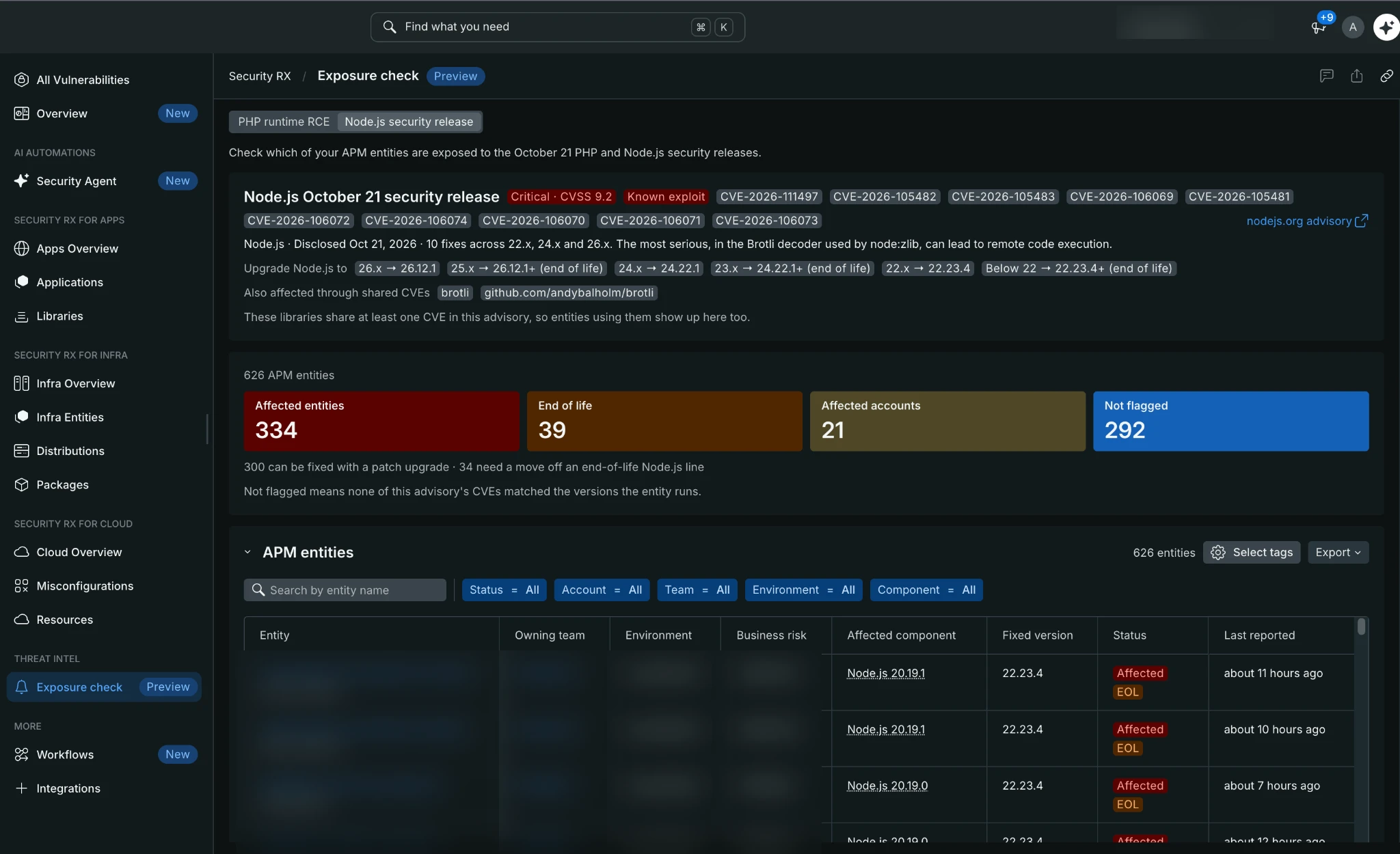
one.newrelic.com > Security RX > Threat intel > Exposure check
The advisory card shows the severity, CVE IDs, a link to the vendor advisory, and the version to upgrade to for each release line. Below it, summary tiles count your affected entities, entities on an end-of-life release, affected accounts, and entities that aren't flagged. The APM entities table lists each entity with its owning team, environment, business risk, runtime version, fixed version, status, and when it was last reported.
Understand the status
- Affected: The entity runs a version that matches at least one of the advisory's CVEs. Upgrade to the fixed version shown below under APM entities.
- Not flagged: None of the advisory's CVEs matched the version the entity runs.
- EOL: The entity runs a release line that no longer receives fixes, for example Node.js 20.x. The fixed version shows the nearest supported release, such as 22.23.4.
중요
Not flagged doesn't mean safe. It means the advisory's CVEs weren't matched to that entity. If some of the advisory's CVEs are not in either Exposure check or Security RX yet, the page shows a warning, and entities can show as Not flagged until the data is complete. You can rerun the check as new details come in, and as often as you want.
Show environment and business risk
Tag keys differ between organizations, so you choose which tag each column reads.
- In the APM entities table, select Select tags.
- Pick a tag key for Environment tag and Business risk tag. Environment defaults to the
environmentkey. Business risk has no default. - Select Apply. Select Reset to return to the defaults.
Your selection isn't saved, so it resets when you reload the page.
Export results
Select Export to download a CSV with one row per entity, including the runtime version, fixed version, matched CVEs, owning team, environment, and business risk.
How Security RX helps
Exposure check shows where one of the recent PHP and Node.js advisories touches your applications. Security RX covers the rest. It detects vulnerable libraries across all your APM entities, ranks them by risk, and helps you track and fix them.
With Security RX access, you also get:
- Current versions. Without Security RX, an entity you've upgraded can still show its old version for up to 3 days. With Security RX, the old version drops off as soon as the entity reports again.
- All vulnerabilities, not only these advisories. Security RX ranks what it finds by CVSS severity, exploit probability, and active ransomware campaigns. See Understand prioritization.
- Status tracking. Mark each finding as Ignored, Affected, or Fixed. See Manage vulnerability status.
- Alerts. Get notified when new vulnerabilities are detected. See Set up vulnerability alerts.
- Jira tickets for the owning team. Workflows create tickets automatically and keep them in sync. See Security RX Jira workflow.
To add Security RX to your account, contact your New Relic admin.
Limitations
Exposure check is a preview of Security RX capabilities. These limits apply:
- Advisories. Exposure check covers only the advisories listed on the page. New Relic decides which advisories to include and whether to offer them outside Security RX.
- Library data without Security RX. Without Security RX, Exposure check counts any library or runtime environment version your agents reported in the last 3 days. An entity you've upgraded can keep showing its old version until that window passes. With Security RX, Exposure check uses each entity's latest library and runtime environment snapshot.
- Data refresh. Library data updates when your agents reconnect at least once a day. A version change, or a newly published CVE or update to an existing CVE, can take up to a day to appear.
Data freshness
The Last reported column shows when each entity last sent data. If an entity you expect is missing, check that it reports library data to New Relic. Entities that don't send it, such as some serverless functions, don't appear.
If you see an error
- You're missing Security RX permissions: Switch to an account you can view, or ask your New Relic admin to grant you permission to view security findings. See Before you start.
- Exposure check isn't available yet: We're rolling the page out to customers. Check back soon.
- No APM entities found: The selected accounts may not have PHP or Node.js entities, nor report library data to New Relic. Try another account or advisory.