Security RX Cloud helps you discover, prioritize, and remediate cloud misconfigurations by integrating with AWS Security Hub. Whether you're an engineer focused on tactical remediation or a security team member managing organization-wide cloud security posture, you'll use the same comprehensive interface with different focuses.
This document covers how to:
- For engineers: Improve cloud security posture in real-time, access detailed remediation guidance, and integrate security fixes into development workflows
- For security teams: Gain organization-wide visibility, coordinate remediation efforts across teams, track progress, and communicate risk to stakeholders
Prerequisites
Before you begin, ensure you have:
- Security RX Cloud integration set up with your AWS account(s)
- AWS Security Hub enabled in your monitored regions
- Access to Security RX in your New Relic account
- For organization-wide visibility: Security RX Cloud configured across all AWS accounts
Dica
New to Security RX Cloud? Start with our setup guide to connect your AWS account and enable auto-discovery.
Access Security RX Cloud
Navigate to one.newrelic.com > All capabilities > Security RX > Cloud to access your cloud security dashboard.
Unlike application and infrastructure views which have individual entity pages, cloud resources are accessed through the central Security RX Cloud interface. This unified approach provides comprehensive visibility across your entire cloud environment.
Understand your cloud security overview
The Cloud tab provides a comprehensive dashboard that helps you contextualize findings, identify top risk areas, and understand trends across your cloud environment.
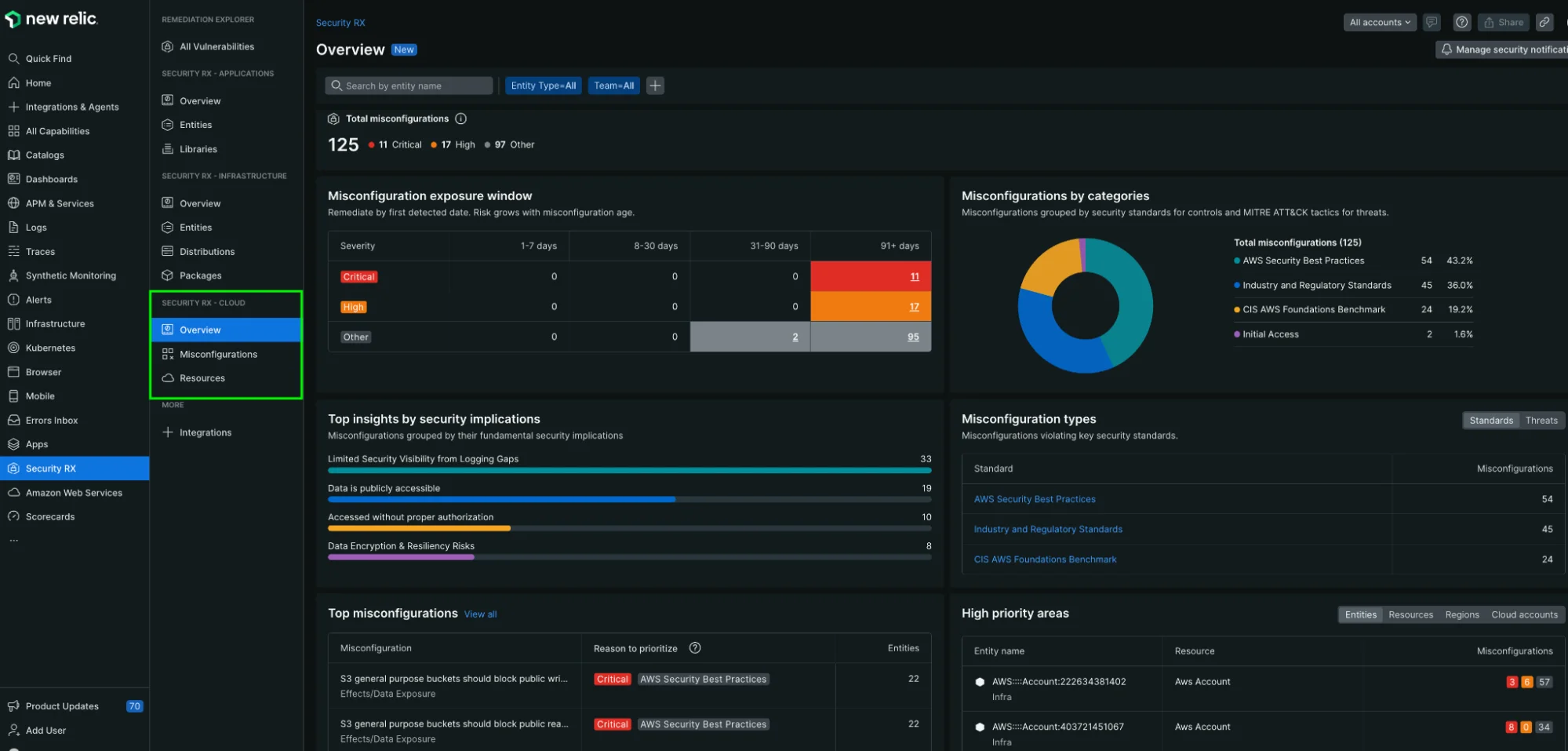
The Security RX Cloud overview dashboard provides comprehensive visibility into your cloud security posture.
Problems the overview solves
- Overwhelming misconfiguration volume: Large numbers of findings make it difficult to understand trends and prioritize efforts
- Lack of visibility: No clear starting point for remediation efforts
- Fragmented security view: No single view across multiple AWS accounts and regions
- Stakeholder reporting: Need for executive-level insights into security posture
Key overview features
The cloud overview page displays:
- New misconfigurations: Recently detected security findings requiring attention
- Top critical regions: Geographic areas with the highest concentration of security issues
- Top resource types: Which AWS services (S3, EC2, RDS, etc.) have the most security findings
- Risk breakdown by category: Misconfigurations organized by security impact type
- Risk by account: Multi-account view showing which AWS accounts need the most attention
- Critical VPC analysis: Virtual private cloud environments with security concerns
Interpreting misconfiguration data
The overview helps you:
- Assess exposure over time: Track whether your security posture is improving or degrading
- View by category: Understand whether you're dealing with compliance issues, active threats, or configuration drift
- Distinguish standards vs threats: Differentiate between compliance violations and active security threats
- Breakdown by dimensions: Filter by issue type, resource type, region, or cloud account for focused analysis
Prioritize and search cloud misconfigurations
After understanding your overall security posture, dive deeper into specific misconfigurations using the detailed views.
Access misconfiguration details
Navigate to the Misconfigurations section within Security RX Cloud to view all detected security findings:
- Go to one.newrelic.com > All capabilities > Security RX > Cloud
- Select the Misconfigurations tab for a detailed list view
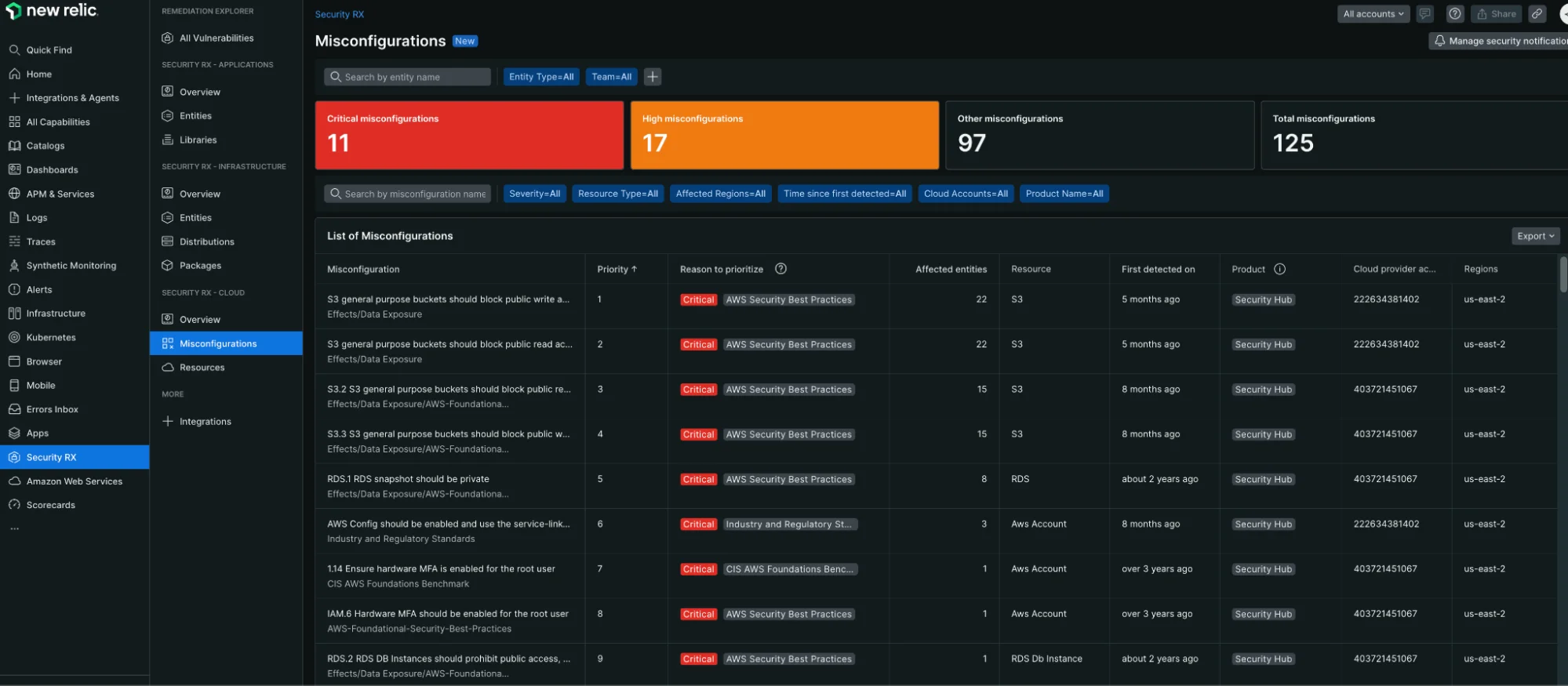
The Misconfigurations tab provides a detailed list view of all security findings with filtering and sorting capabilities.
Filter and sort misconfigurations
Use the filtering and sorting capabilities to focus on what matters most:
- Sort by risk level: Focus on critical and high-severity findings first
- Filter by resource type: View misconfigurations for specific services (S3, EC2, RDS, etc.)
- Sort by detection time: See the most recently discovered issues
- Filter by region: Focus on specific AWS regions
- Filter by account: Multi-account environments can filter by specific AWS accounts
Resource-level analysis
Use the Resources tab to understand security issues from a resource perspective:
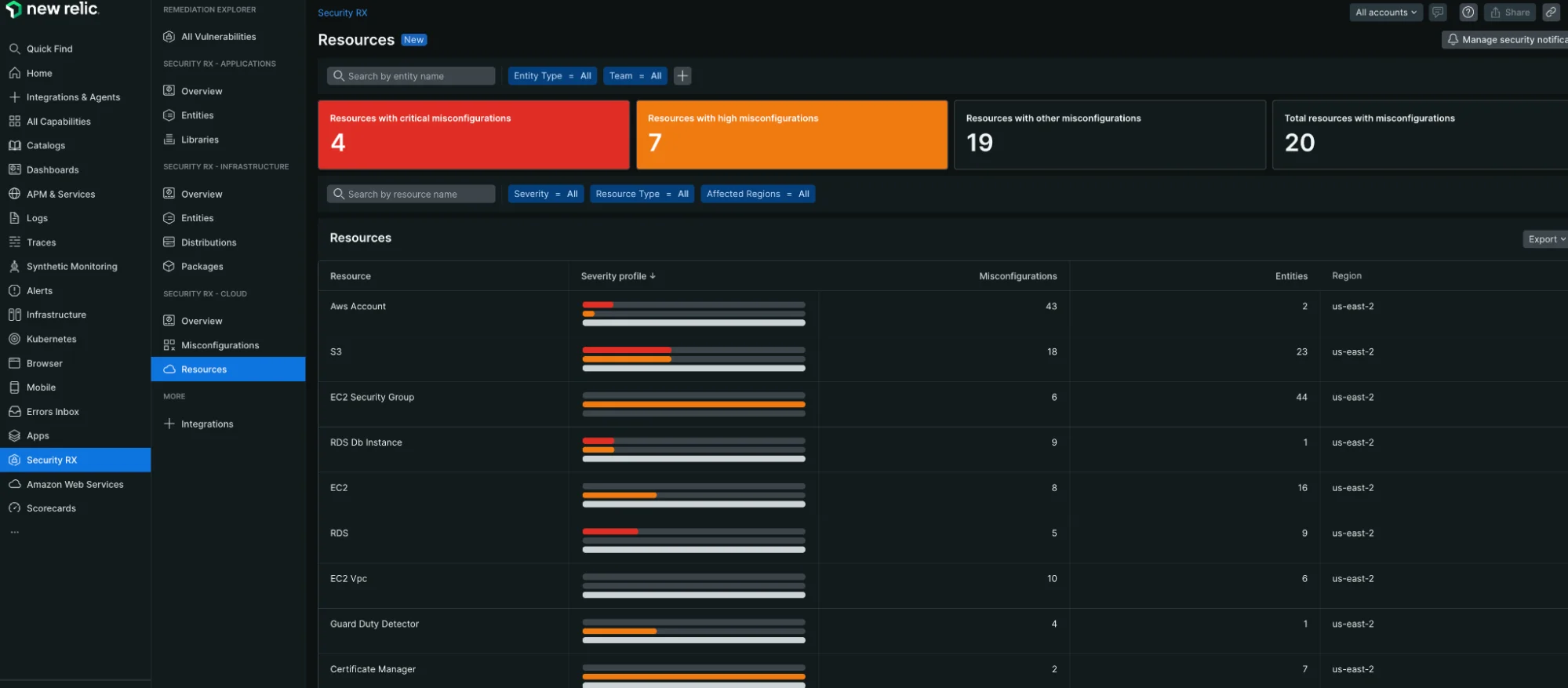
The Resources view provides a comprehensive breakdown of cloud resources organized by security posture and ownership.
Key capabilities:
- Contextualize severity profiles: See how many critical, high, medium, and low findings each resource has
- Prioritize remediation efforts: Focus on resources with multiple high-severity findings
- Understand blast radius: See which resources are most critical to your infrastructure
- Entity ownership mapping: Associate cloud resources with responsible teams through tagging and metadata
For engineers: Triage and remediate misconfigurations
When you've identified a misconfiguration to address, click on it to access detailed information and remediation guidance.
Problems this workflow solves
- Remediation overwhelm: Not knowing where to start when facing hundreds of misconfigurations
- Difficulty assessing impact: Hard to understand the true risk and affected area of a misconfiguration
- Research overhead: Time wasted looking up how to fix security issues
- Context switching: Having to leave New Relic to research and implement fixes
Understanding misconfiguration details
Each misconfiguration detail page provides:
- Risk assessment: Why this misconfiguration matters and its potential impact
- Affected resources: Complete list of resources with this security finding
- Resource context: Current configuration, team ownership, tags, and operational metrics
- Remediation guidance: Step-by-step instructions for multiple workflows
Access remediation instructions
Security RX Cloud provides comprehensive, AI-generated remediation playbooks with multiple workflow options:
- Console: Step-by-step instructions for fixing the issue in the AWS Management Console
- CLI: Copy-pasteable AWS CLI commands with explanations
- CloudFormation: Production-ready Infrastructure as Code snippets
- Terraform: Terraform code snippets for infrastructure automation
- Verification: Post-fix checklist to confirm the issue is resolved
Best practices for engineers
- Start with critical findings: Focus on high-risk misconfigurations that could lead to data exposure
- Use Infrastructure as Code fixes: Prefer CloudFormation or Terraform remediation to prevent configuration drift
- Verify fixes: Always run the verification steps to ensure the misconfiguration is truly resolved
- Update your templates: Apply fixes to your infrastructure code templates to prevent recurrence
Integration with development workflow
Security RX Cloud is designed to fit into your existing development and operational processes:
- CI/CD integration: Use the remediation code snippets in your infrastructure pipelines
- Incident response: Quickly identify and fix security issues during incidents
- Regular maintenance: Use the overview dashboard for regular security hygiene reviews
- Team collaboration: Share misconfiguration details and remediation plans with team members
For security teams: Coordinate organization-wide remediation
Security teams need to coordinate remediation efforts across multiple development and operations teams while tracking progress and ensuring accountability.
Problems this workflow solves
- Resource allocation: Uncertainty about where to focus security team efforts for maximum impact
- Remediation assignment: Difficulty assigning security findings to the right teams and individuals
- Progress tracking: No visibility into whether assigned remediation work is being completed
- Team collaboration: Challenges coordinating between security, development, and operations teams
- Escalation management: Unclear processes for handling overdue or critical security findings
Key metrics for security leaders
The cloud overview provides executive-level insights including:
- Total misconfiguration count: Overall volume and trends over time
- Risk distribution: Breakdown of critical, high, medium, and low-risk findings
- Account-level analysis: Which AWS accounts pose the highest risk
- Regional distribution: Geographic concentration of security issues
- Resource type analysis: Which AWS services require the most attention
- Compliance posture: Standards-based findings vs. active threat indicators
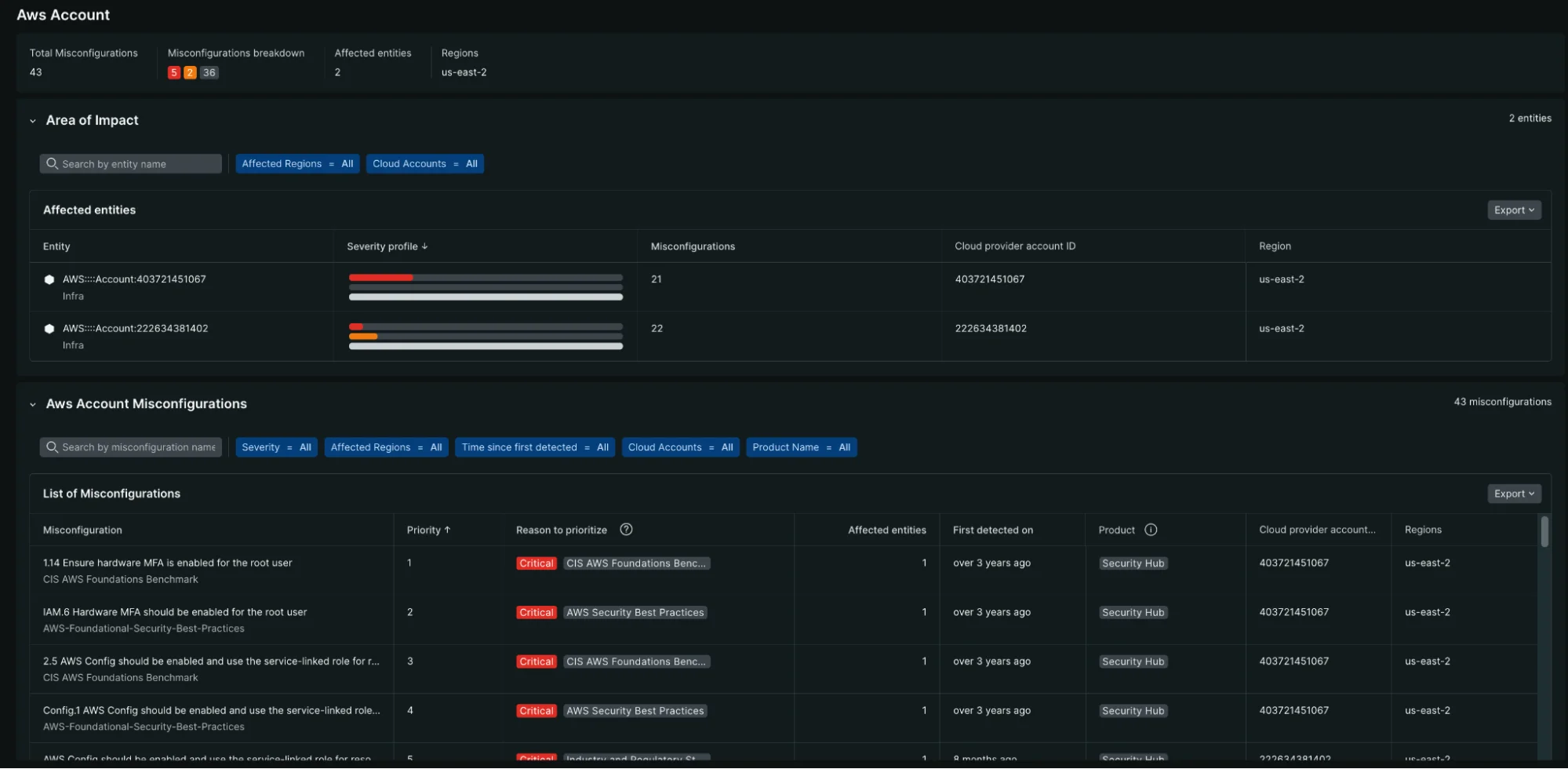
The AWS Account view provides detailed insights into which accounts pose the highest security risk and their misconfiguration breakdown.
Trending and historical analysis
Use the time-based controls to understand:
- Security posture trajectory: Whether your organization is improving or degrading over time
- Remediation velocity: How quickly teams are addressing security findings
- New vs. resolved findings: Balance between new discoveries and remediation efforts
- Seasonal patterns: Whether certain times correlate with more security issues
Team-based remediation management
Advanced security workflows
Risk-based prioritization
Security teams need to make strategic decisions about resource allocation and risk acceptance:
- Risk scoring validation: Review and adjust Security RX Cloud's intelligent risk scoring based on organizational context
- Compliance mapping: Understand which findings relate to specific compliance frameworks (SOC 2, PCI DSS, etc.)
- Business impact assessment: Correlate security findings with business-critical applications and data
- Risk acceptance documentation: Track decisions about accepted risks and their justifications
Metrics and KPIs for security programs
Use Security RX Cloud data to measure and improve your security program:
- Mean time to remediation (MTTR): Track how quickly your organization addresses security findings
- Security debt: Monitor the accumulation of unaddressed security findings over time
- Team performance: Compare remediation velocity across different teams and applications
- Trend analysis: Identify whether your security posture is improving over time
Integration with security tools and processes
- SIEM integration: Export security findings to your Security Information and Event Management system
- Ticketing integration: Automatically create tickets in Jira, ServiceNow, or other systems
- Compliance reporting: Generate reports for auditors and compliance teams
- Executive dashboards: Create executive-level views of security posture and progress