Included patch files
This V3.0 SP12 release contains one file:
- K-300SP12NEWR.SAR
Implementation procedures
Service pack installation and configuration
- Where to install: Deploy this service pack to client 000 of your Central Monitoring System.
- Configuration location: Perform all subsequent configuration tasks in the business client of your Central Monitoring System.
- Complete instructions: For step-by-step installation procedures, consult Installation Guide V3.0 (Appendix VIII: Install Service Pack) or Admin Guide V3.0 (Section: Install Service Pack).
Updates in this patch
SP12 is a collection of New Relic Notes addressing bug fixes and new features:
NR 1344
New parameter AIF_TABLES for NR_SAP_AIF_ERROR allows retrieving error messages from tables other than /AIF/STD_IDX_TBL.
NR 12-02
Fixes issues and adds new features for API-based data providers:
- Fixed code dump in
/NEWR/API_DATA_COLLECTORwhen API destination is not reachable - Fixed resource failure when extracting CALM Landscape Data
- Fixed resource failure when extracting BTP Message Processing Log
- Added validation for Service ID (LMSID) configured as CALL ID for all data providers under monitoring group CALM
- Added certificate validity check before calling Data Collection API
NR 12-03
Implements collection delay and fixed data collection window for the collection manager and testing by call ID in registry.
NR 12-05
Implements the following enhancements:
- Pagination support for data providers in CALM monitoring group
- New program parameter to allow RFC check program to check a single RFC destination
- Configuration to force data provider test only for a single call ID
Fixes the following issues:
- Blank call ID on collection manager output
- Credential validation issue for
NR_CF_AUDIT_EVENTS
NR 12-06
New data provider NR_SAP_ABAP_WS_COMPLETE collects ABAP web service events.
Additional bug fixes
In addition to the above notes, SP12 also fixes the following issues:
- Fixed timestamp issue with table retrieval data provider function modules
/NEWR/RFC_EVENTS_COLLECTORand/NEWR/RFC_EVENTS_COLLECTOR2 - Added Transaction ID to IDoc events to facilitate linking to trace records
Manual configuration updates
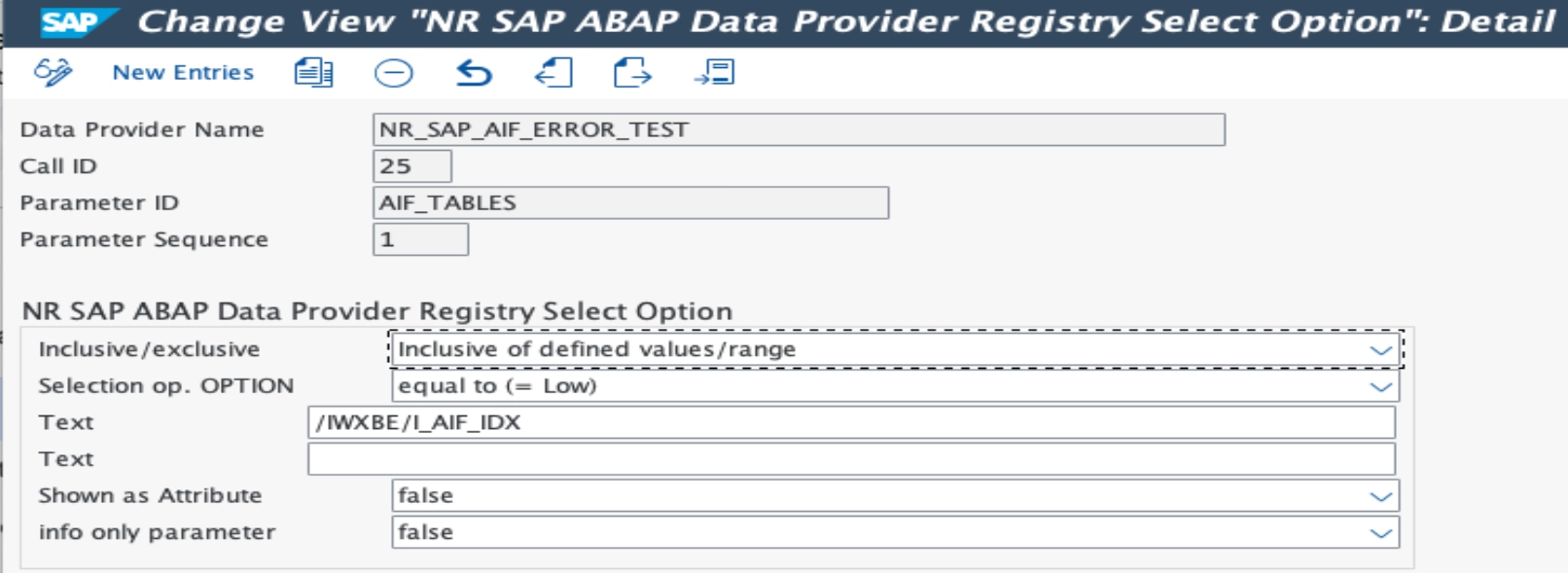
Add new parameter to NR_SAP_AIF_ERROR
To configure the new AIF_TABLES parameter:
- Apply the included transport to the Central Monitoring System.
- Go to transaction
/n/NEWR/REGISTRY. - Select data provider
NR_SAP_AIF_ERRORand click Configure. - Add parameter
AIF_TABLESand enter the table name specified in/AIF/T_IDX_TBLfor the configured namespace/interface/version combination.
Conseil
If AIF_TABLES is left blank or not specified, the index table defaults to the standard single index table /AIF/STD_IDX_TBL.
Configure collection delay and fixed collection window
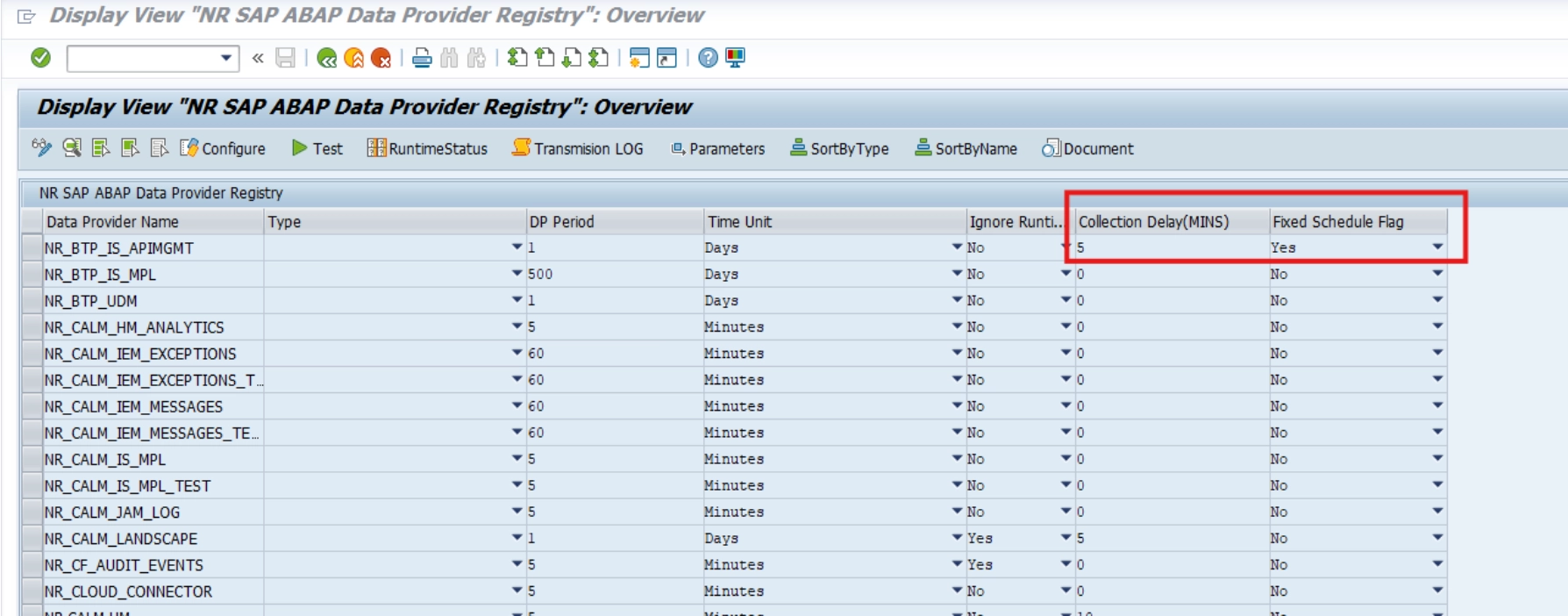
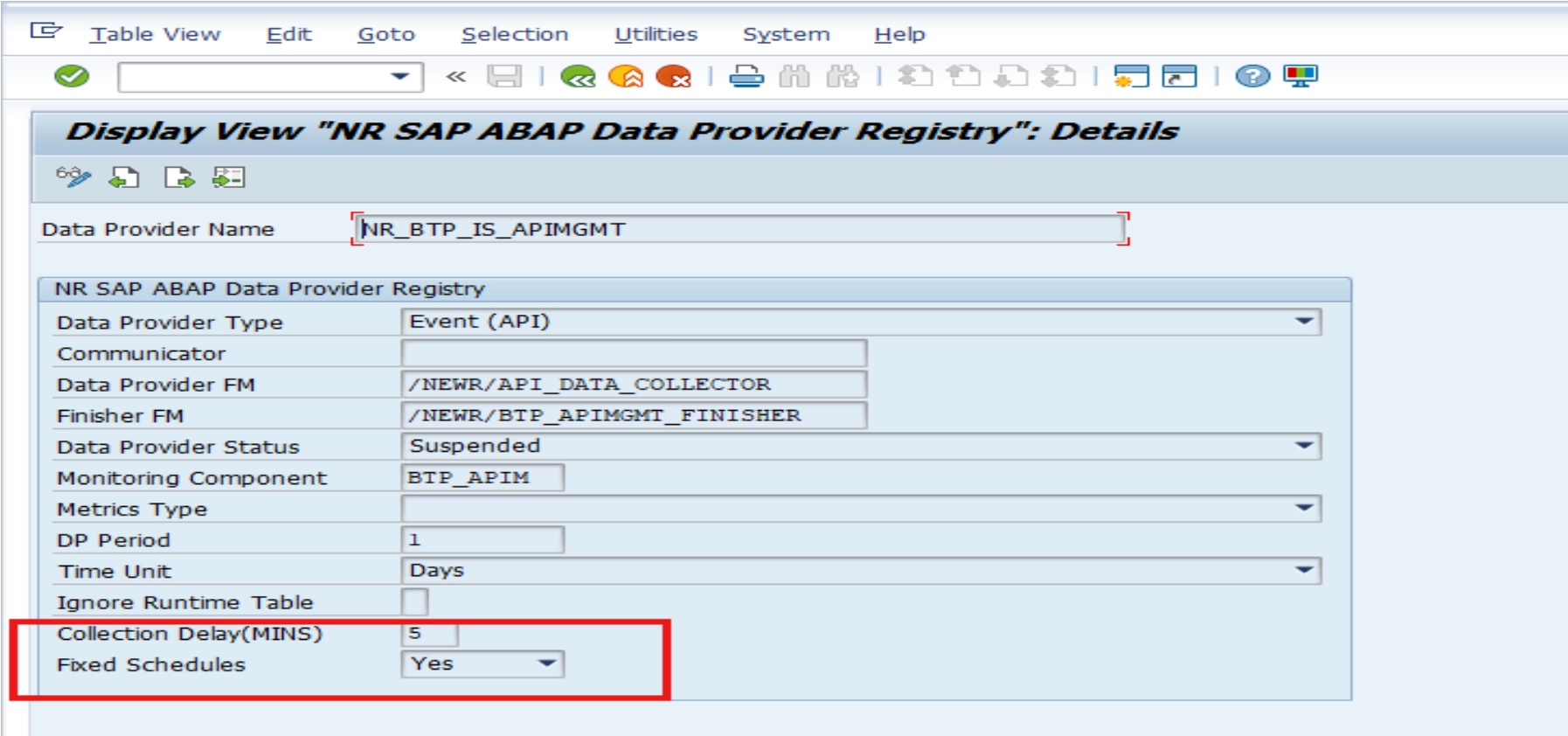
Two new configuration fields have been added to the Data Provider Registry to address data gaps caused by floating collection boundaries and database latency.
New fields in data provider registry:
- DATA_COLLECTION_DELAY: Specifies a purposeful delay in minutes to subtract from collection timestamps. This buffer ensures late-arriving data from database updates are captured before the collection window closes.
- FIXED_SCHEDULES: Flag to enable fixed collection periods. When set to
X, seconds are stripped from collection timestamps to create consistent, predictable collection windows.
How it works:
Fixed Schedules (FIXED_SCHEDULES = 'X'):
- Collection timestamps are normalized by removing seconds.
- Example: 12:12:23 becomes 12:12:00.
- Creates consistent, aligned collection boundaries across all collections.
Data Collection Delay (DATA_COLLECTION_DELAY > 0):
- Subtracts the specified delay in minutes from both start and end data collection timestamps.
- Shifts the collection window backward to capture missed database updates.
- Example: 2-minute delay changes 10:00:00 - 10:05:00 to 09:58:00 - 10:03:00.
New parameter on RFC check program
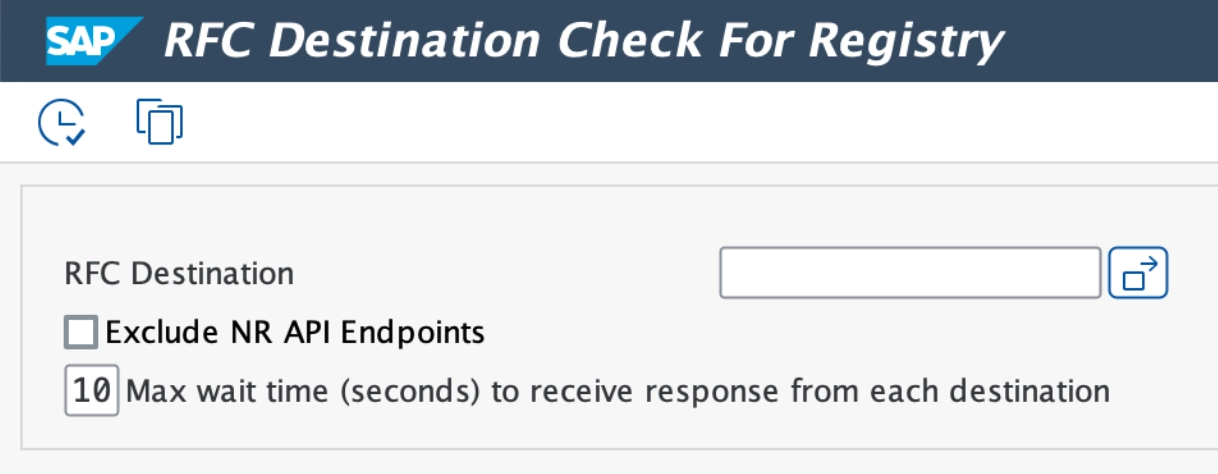
A new RFC Destination parameter has been added to the RFC check program /NEWR/REGISTRY_RFC_CHECK. This enables the program to check an individual RFC destination. If left blank, all configured RFC destinations will be checked.
Configuration parameter to set data provider test for a single call ID
To access global parameters:
- Go to menu
/n/NEWR/INSTALL. - Use menu path SAP Menu > Expert Mode > Installation Setups > Global Configuration.
- Or use transaction code
/n/NEWR/Config.
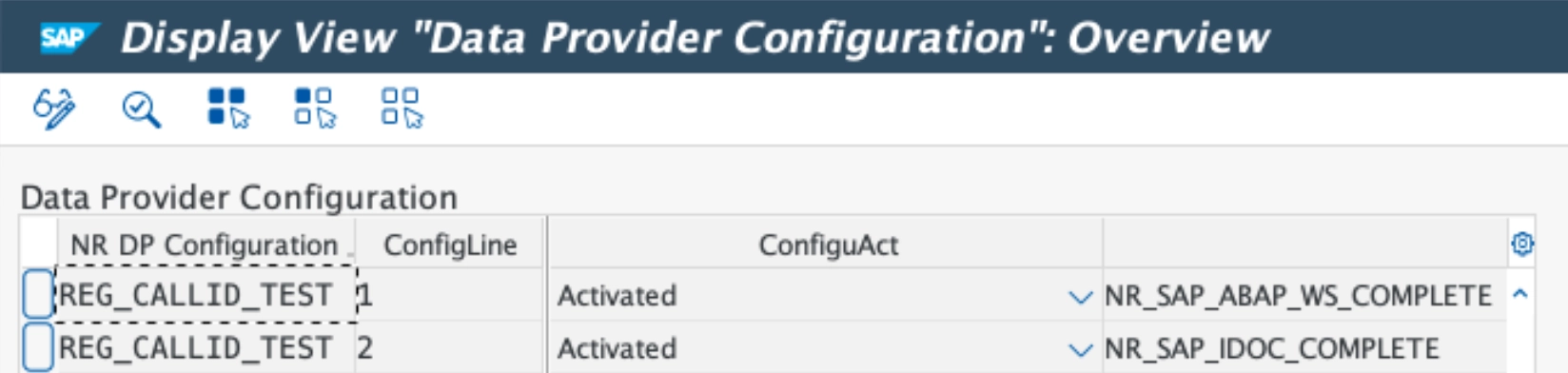
Configuration parameter: REG_CALLID_TEST
Parameter value: <DP name> (default delivered: NR_SAP_ABAP_WS_COMPLETE, NR_SAP_IDOC_COMPLETE)
New data providers for ABAP business systems
NR_SAP_ABAP_WS_COMPLETE
Processes web service message headers and data (tag) records in parallel across monitored systems without record limitations.
Configuration:
- Type: Event
- Communicator: N/A
- Data Provider Function:
/NEWR/WS_MESSAGES_ARFC - Data Provider RFC enabled: Yes
- Finisher Function:
/NEWR/WS_EVENTS_FINISHER - Monitoring Group:
SAP_APPL
Functional overview
This data provider comes pre-activated. Required parameters:
ADAPTER_TYPE- Purpose: Specify adapter type to be selected from ABAP web service message header. Filter option of function module
/SDF/IMA_DC_WS_ABAP. - Sign: Inclusive only
- Option: EQ
- Values: Table fields separated by
;, can be multiple lines
- Purpose: Specify adapter type to be selected from ABAP web service message header. Filter option of function module
DESTINATION- Purpose: Specify RFC destination
- Sign: Inclusive only
- Option: EQ
- Values: RFC destination
DPC_COLL_TIME- Purpose: Determine time interval
- Sign: Inclusive only
- Option: BT
- Values: System generated begin timestamp and end timestamp
IB_IF_NAME- Purpose: Receiver interface name to be selected from ABAP web service message header. Filter option of function module
/SDF/IMA_DC_WS_ABAP. - Sign: Inclusive only
- Option: EQ
- Values: Receiver interface names separated by
;, can be multiple lines
- Purpose: Receiver interface name to be selected from ABAP web service message header. Filter option of function module
IB_PARTY- Purpose: Receiver party to be selected from ABAP web service message header. Filter option of function module
/SDF/IMA_DC_WS_ABAP. - Sign: Inclusive only
- Option: EQ
- Values: Receiver party separated by
;, can be multiple lines
- Purpose: Receiver party to be selected from ABAP web service message header. Filter option of function module
JOIN_CONDITION- Purpose: Specify join records for table
/NEWR/JOIN_CONDfor further processing - Sign: Inclusive only
- Option: EQ
- Values: Display titles separated by
;, can be multiple lines
- Purpose: Specify join records for table
NR_ACCID- Purpose: Specify New Relic account ID
- Sign: Inclusive only
- Option: EQ
- Values: New Relic account ID
OB_IF_NAME- Purpose: Sender interface name to be selected from ABAP web service message header. Filter option of function module
/SDF/IMA_DC_WS_ABAP. - Sign: Inclusive only
- Option: EQ
- Values: Sender interface names separated by
;, can be multiple lines
- Purpose: Sender interface name to be selected from ABAP web service message header. Filter option of function module
OB_PARTY- Purpose: Sender party to be selected from ABAP web service message header. Filter option of function module
/SDF/IMA_DC_WS_ABAP. - Sign: Inclusive only
- Option: EQ
- Values: Sender parties separated by
;, can be multiple lines
- Purpose: Sender party to be selected from ABAP web service message header. Filter option of function module
SETTING_SWITCH- Purpose: Specify options used by distributed processing
- Sign: Inclusive only
- Option: EQ
- Values: Multiple options separated by
;to control the distributed process:- HEADONLY=
SPACE(default): Provides both header and TAG data (if TAG names are specified inTAG_LISTparameter).X: Only provides header data even if TAG names are specified inTAG_LISTparameter.
- FIRSTONLY=
X(default): The data provider extracts data exclusively from the first occurrence of each TAG listed inTAG_LISTparameter.SPACE: The data provider extracts data from all occurrences of each TAG listed inTAG_LISTparameter.
- FREE%=nn: Specify the percentage of the available Working Processes in the monitoring system to determine the Desired Free Working Processes Limitation:
- If the number of free Working Processes in the current monitoring system is equal to or greater than this Desired Free Working Processes Limitation, continue the distribution processing.
- Otherwise, wait 1 second and repeat the check above until either:
- The distribution processing can continue, or
- The total waiting time exceeds the specified Maximum Waiting Time (see
MWAIT#=nn).
- The default value for this option is 30(%).
- MINFT#=nn: Specify the Minimum Free Working Processes Limitation:
- If the Desired Free Working Processes counted by the monitoring system falls below this minimum threshold, the system will pause for 1 second before attempting further processing.
- The default value for this option is 3.
- MWAIT#=nn: Specify the maximum waiting time (in seconds).
- If the total waiting time (see
FREE%=nn) exceeds the specified maximum, the distribution process will be canceled to conserve system resources. - The default value for this option is 60.
- If the total waiting time (see
- MREC#=nnnnn: Specify the number limitation of the Web Service Message Header records retrieved each time when calling Function Module
/SDF/IMA_DC_WS_ABAP.- The default value for this option is 10000.
- JSEND#=nnnn: Specify the number limitation of the result attribute records sent to New Relic server each time.
- The default value for this option is 5000.
- USER=user: Specify the RFC user name for each monitored system to retrieve the total number of work processes currently used by that system. The
useris the SAP user ID. - DPWP#=nn: Specify the Maximum Working Processes Limitation.
- During distributed processing: If the number of free Working Processes in the current monitoring system is less than or equal to this maximum limit, continue the distributed processing.
- Otherwise, wait 1 second and then loop back to check again.
- Continue this loop until the distributed processing can proceed or the total waiting time exceeds the specified Maximum Waiting Time (
MWAIT#=nn). - Note: This check is only executed when the USER parameter is specified with non-initial values.
- The default value for this option is 8.
- HEADONLY=
STATE_GROUP- Purpose: Processing status group to be selected from ABAP web service message header. Filter option of function module
/SDF/IMA_DC_WS_ABAP. - Sign: Inclusive only
- Option: EQ
- Values: Processing status groups separated by
;, can be multiple lines
- Purpose: Processing status group to be selected from ABAP web service message header. Filter option of function module
SYS_ID- Purpose: Determine system ID
- Sign: Inclusive only
- Option: EQ
- Values: System ID
TAG_LIST- Purpose: Specify TAG names to be selected from ABAP web service message data and displayed as output in message data. Filter option of function module
/SDF/IMA_DC_WS_ABAP. - Sign: Inclusive only
- Option: EQ
- Values: Table fields separated by
;, can be multiple lines
- Purpose: Specify TAG names to be selected from ABAP web service message data and displayed as output in message data. Filter option of function module
USERNAME- Purpose: User names who created message to be selected from ABAP web service message header (
CREATED_BY). Filter option of function module/SDF/IMA_DC_WS_ABAP. - Sign: Inclusive only
- Option: EQ
- Values: User names separated by
;, can be multiple lines
- Purpose: User names who created message to be selected from ABAP web service message header (