Important
In this document, we use the new terms "issue" and "alert event." Please see this article for a full explanation of these terms.
To make the most of the info on this page, we recommend understanding the meaning of these terms:
Issues. Issues are groups of alert events related to the same underlying problem. When a new alert event is created, alert event intelligence may open a new issue and evaluates other open issues for possible correlation. See Issues and alert event management and response for more information.
Alert events. Alert events are events that describe the symptoms affecting your system over time. See View alert event details for more information.
Conditions. A condition describes a monitored data source and the behavior of that data source that will be considered an alert event. See Create conditions for more information.
Policies. A policy is a group of one or more conditions. See Manage your policies for more information.
Issues determine when you're notified about alert events disrupting your business. These alert events occur when they meet your alert conditions. For example, you can have alert conditions about CPU overage, synthetic monitoring crashes, or slow web app response times.
When you can control the policy conditions that create issues, you make sure that you're notified about important ongoing or recurring problems. This way you won't be bombarded with unnecessary notifications and avoid noise.
Learn how to set issue preferences by your policy, condition, or condition and signal combination.
Select your issue preference
By default, a single issue record is created for each policy.
To change the issue preference for the selected policy:
Go to one.newrelic.com > All capabilities > Alerts > Alert Policies.
Select a policy.
Modify the Issue creation preference, select your choice of available options, and then Save.
Repeat these steps for each policy as needed.
Critical and warning alert events
Choose from two threshold types when a policy condition is met:
- Critical (red)
- Warning (yellow)
When a policy condition breaches a threshold, an alert event is opened and an issue record can be created with detailed information to help you respond efficiently. The issue record may also include any other alert events occurring after the opening alert event.
Notifications are sent to every notification channel on the policy as well as all destinations on any workflow that is properly configured when an issue opens, if and when an issue is acknowledged, and when an issue closes.
Issue preference options
Each issue preference option has its own advantages. You can select any preference for any policy.
Issue preference | Description | Advantages |
|---|---|---|
Only one issue will be open at a time for the entire policy. |
| |
One issue will be open at a time for each condition in your policy. |
| |
This option groups the alert events sharing the same condition and signal into their own issue. |
|
One issue per policy (default)
Choose the One issue per policy preference if your policy and its conditions have a focused scope, like monitoring one entity.
If additional conditions open alert events after the issue opens, the alert events are added to the same issue. You will only see one issue on your Issues & activity page for the selected policy. Learn more about your issue creation preferences.
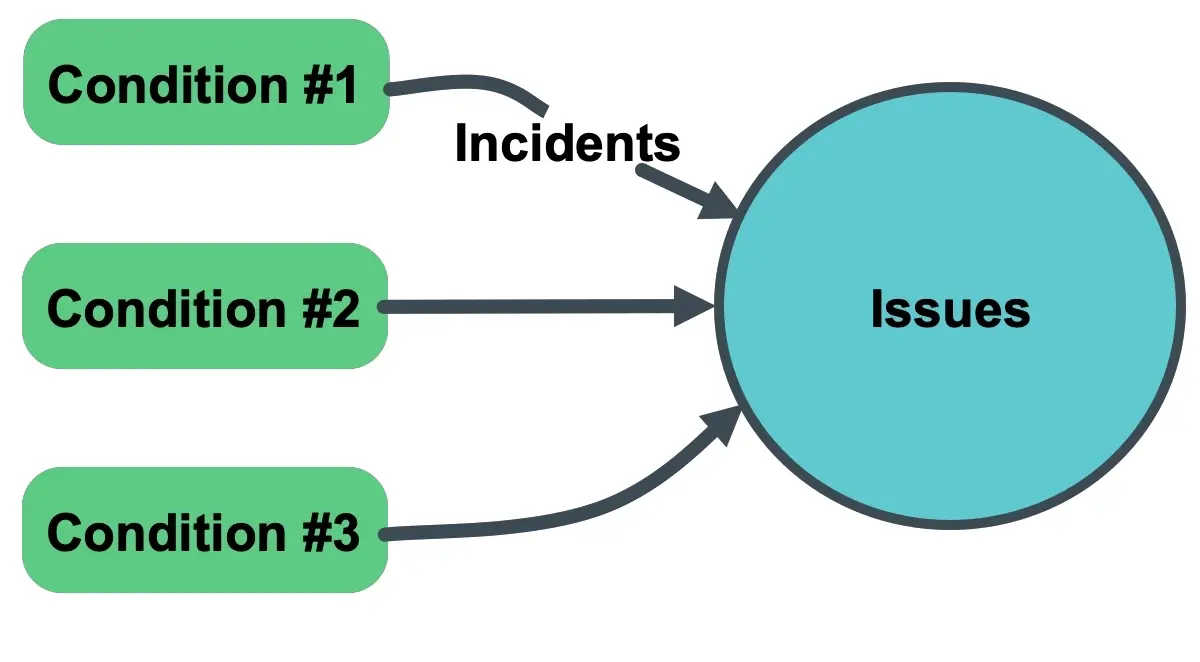
When you select the default option One issue per policy as your issue preference, it will group all alert events opened by any condition on that policy into the same issue.
One issue per condition
Choose the One issue per condition option when you want an individual issue record to focus on a specific condition. If the policy has multiple conditions, you will see separate issue records for each condition on your Issues & activity page. Learn more about your issue creation preferences.
- If a signal breaches a condition's threshold, an alert event opens and it creates an issue record.
- If the same signal breaches another condition's threshold, another alert event opens and another issue record is created.
- If additional signals open alert events on the same condition after the issue opens, these alert events are added to the issue record already opened for that condition.
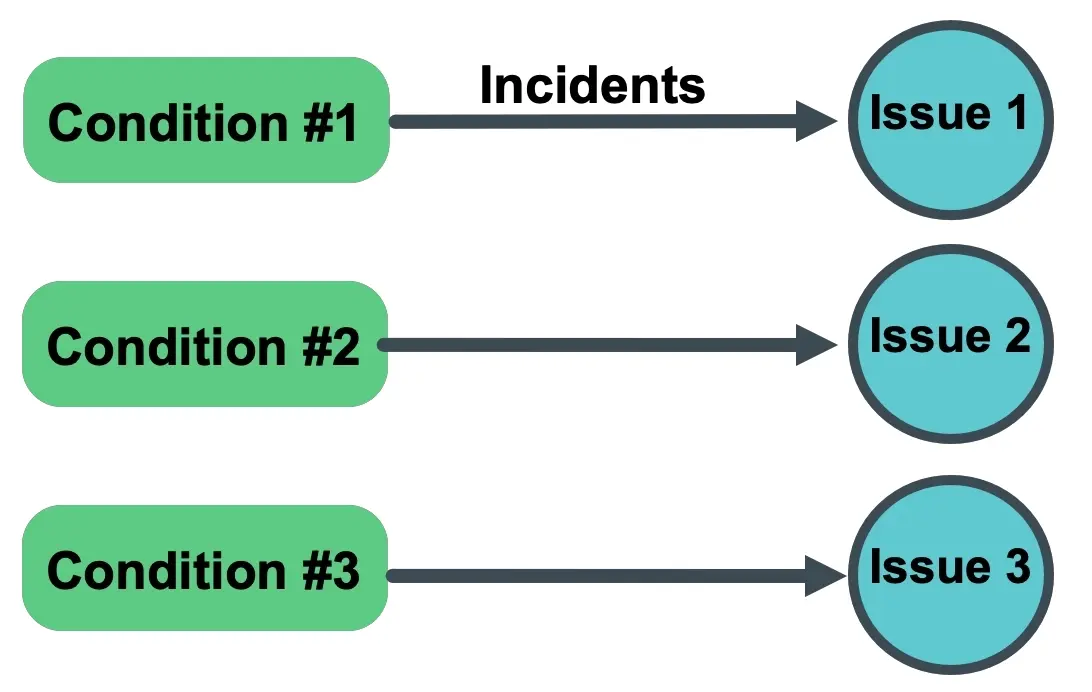
When you select the option One issue per condition as your issue preference, it will group all alert events by any signal for a specific condition into separate issues.
One issue per condition and signal
The One issue per condition and signal option is the most granular level for creating issue records. Choose this issue preference when you want to closely monitor anything that is occurring anywhere across your infrastructure. Learn more about your issue creation preferences.
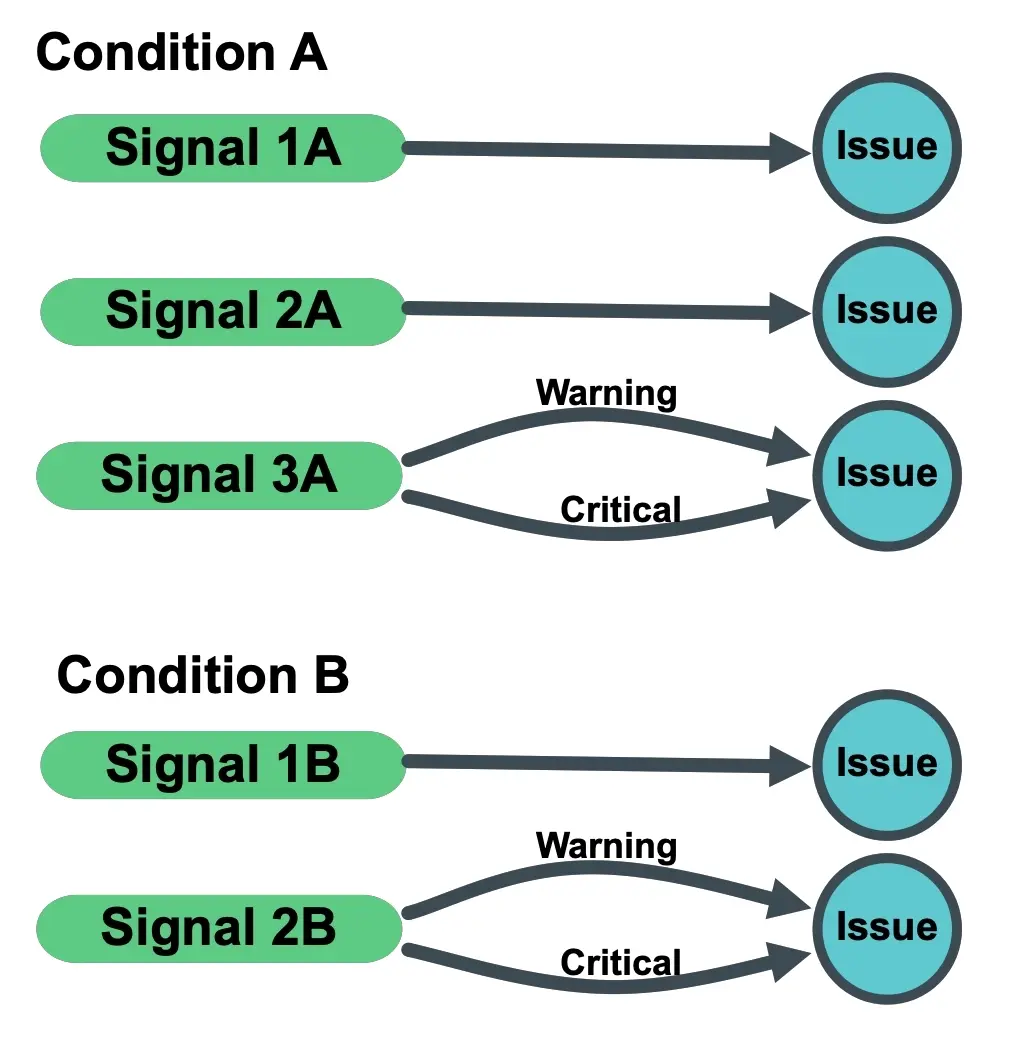
When you select One issue per condition and signal as your issue preference, it will group alert events sharing the same condition and signal into their own issue. If the same signal on a condition opens another alert event after an issue opens (for example, a warning alert event may open, followed by a critical alert event a short time later on the same signal), that new alert event is added to the same issue. You will only see one issue on your Issues & activity page for the selected condition/signal combination.